When a timezone setting becomes a root shell: Four OT edge lessons in Cyber Security to learn in Industrial Automation

Most of us treat the timezone field on a device web page as the least dangerous setting on the box.

You pick “Asia/Kolkata”, click save, move on. One of the late-October CISA advisories shows how that field can end with an attacker holding full control of a transformer monitor.

This post walks through that case and three sibling advisories from the same fortnight. The goal is simple:

1) Things a firmware engineer can change in the next build,

2) Questions a plant buyer can ask a vendor before the next purchase order.

Tell us what you need on site

Need this on your plant? Tell us your requirement

The lead case: a timezone handler that builds a shell command

On 29 October 2026, CISA published ICSA-26-302-03 for Hitachi Energy CoreTec, the transformer monitoring product line. Two CVEs are in it.

CVE-2026-13162, configuration to command execution. Per the advisory, the bug lets authenticated users with certain roles execute arbitrary system commands with full control over the device.

The location is specific: the configuration daemon’s time synchronization handler, which sets the system timezone. When it processes a timezone update, the daemon constructs a shell command by concatenating user-supplied input without any sanitization or validation. CISA classes it as CWE-78, CVSS v3.1 base score 7.5.

Affected versions are CoreTec4 and CoreTec5 3.4.0 and prior, with CoreTec5 version 5.0.0 as the vendor fix.

CVE-2026-43284, a kernel feature nobody needed at the edge. The second CVE is in the Linux kernel IPsec ESP subsystem (esp4) used in CoreTec5, letting a local unprivileged user escalate to root. The detail worth reading twice: in CoreTec5, the vulnerable ESP component is compiled into the kernel as a built-in and is present at boot. It scores CVSS v3.1 8.8.

Put the two together and you get a familiar chain shape: a configuration path that reaches a shell, and a kernel that ships more attack surface than the product uses.

What went wrong, in engineering terms

Nothing here is exotic. It is the pattern most of us have written at least once:

# illustrative only, not vendor code
system("timedatectl set-timezone " + tz_from_request);

Three decisions stack up:

  1. A config value reaches a shell interpreter. Once a string goes through

    sh -c,

    characters like ;, $( ), backticks and newlines are code, not data.

  2. Role checks in the web UI do not help if the role that can change time settings is wider than the role that should run commands.
  3. No allow-list on a field that has a tiny valid set. Timezones are a finite list. NTP servers are hostnames or IP addresses. Neither needs free text.
  4. The daemon runs with privileges far above the job. Setting a timezone needs write access to one link or one file. It does not need root over the whole device.

The kernel side is a separate lesson. A built-in feature cannot be unloaded or blacklisted in the field. If the product does not terminate IPsec on that box, the cheapest fix is the one done at build time: do not compile it in.

Firmware-side fixes you can apply this sprint:

  • Never pass config values to a shell. Call the binary directly with an argument array (execve-style), or better, write the file yourself.
  • Validate against an allow-list: the tz database list for timezones, a strict hostname or IP parser for NTP.
  • Run config daemons as a dedicated user with only the capabilities they need. Split “write config” from “apply config”.
  • Audit kernel =y options against what the product actually does. Drop unused network protocol families, filesystems and debug features.

Three sibling patterns from the same fortnight

B. “Localhost-only” is not a security boundary

Also on 29 October, CISA published ICSA-26-302-02 for Hitachi Energy TRO600 series. CVE-2026-10756 lets an authenticated attacker bypass network access restrictions and reach services intended to be reachable only from localhost, by using port forwarding. A second CVE, CVE-2026-106087, lets an unauthenticated attacker read or download arbitrary files, including configuration files and password data. The advisory lists 9.2.1.6 and prior as affected, with 9.2.2.1 as the update.

The lesson for designers: binding an admin service to 127.0.0.1 reduces exposure, it does not authenticate anyone. Any SSH tunnel, reverse proxy or helper process on the box can turn “local” into “remote”. Internal services still need their own authentication, and port forwarding should be disabled unless the product needs it.

Reviewing edge firmware for your plant?

Tell us what you are checking and we will get back to you.

C. A general-purpose Linux runtime on a controller is a patch obligation

On 22 October, ICSA-26-295-11 covered the additional GNU/Linux subsystem of firmware V3.1.7 on the SIMATIC S7-1500 CPU 1518(F)-4 PN/DP MFP, including the SIPLUS variant. The CISA page lists 428 vulnerabilities for the product. Siemens states that no fix is currently available and fixes are being prepared. Interim mitigations are to limit interactive shell access of the GNU/Linux subsystem to trusted personnel and only build and run applications from trusted sources. The vendor advisory is Siemens ProductCERT SSA-457936.

This is not a knock on any one vendor. Any product that ships a general-purpose distribution inherits that distribution’s CVE stream. The useful questions are about discipline: Is there an SBOM? How fast do upstream fixes reach a signed update? Can the update be applied in a plant shutdown window without a site visit?

D. A poller that does not check who it is talking to

ICSA-26-295-18, also 22 October, lists Siemens RUGGEDCOM APE1808 with Nozomi Guardian/CMC as affected. It is a republication of Siemens ProductCERT SSA-911336. The CVE that matters for poller design is CVE-2026-33389: the Smart Polling feature established encrypted connections to target devices without validating the remote host’s identity, with no option to enable it. A man-in-the-middle can then impersonate the device, capture the credentials, and replay them against that device or other devices sharing the same credentials. Siemens advises contacting customer support for patch information.

Encryption without identity checks only tells you nobody else can read the session. It does not tell you who is on the other end. And shared credentials across a fleet turn one captured password into many.

A checklist for edge designers and buyers of Automation Control Products (Not Gated, because we understand its seriousness)

Use this as a design review list, or attach it to an RFQ for gateways, edge controllers and monitoring units.

Configuration handling

  • Does any configuration field (timezone, NTP, hostname, DNS, SNMP community, alarm script) ever reach a shell? Ask the vendor to say so in writing.
  • Are inputs validated against allow-lists, not just length limits?
  • Which role can change time and network settings, and is that role narrower than “admin”?

Least privilege on the box

  • Which daemons run as root? Which ones need to?
  • Is the kernel configuration trimmed for the product, or is it a stock build with everything built in?
  • Are debug shells and interactive consoles disabled or restricted in production images?

Internal services

  • List every service bound to localhost. Does each one authenticate on its own?
  • Is SSH port forwarding or tunnelling disabled unless explicitly needed?
  • Can an unauthenticated request read any file? Ask for the vendor’s last penetration test scope, not just the result.

SBOM and updates

  • Is a machine-readable SBOM available for every firmware release?
  • What is the vendor’s stated time from upstream CVE to signed update?
  • Are updates signed, verified on the device, and rollback-safe? Can they be staged for a shutdown window?
  • If no fix exists yet, what interim mitigations does the vendor publish?

Polling and peer identity

  • Does every poller (Modbus TCP gateways, SNMP, SSH, HTTPS, OPC UA clients) verify the identity of the device it connects to?
  • Can certificate or host key validation be turned on, and is it on by default?
  • Are field device credentials unique per device or per zone, and rotatable?

None of this needs a new product. Most of it is a design review and a few pointed questions before purchase.


Next step

At Embedos we build and commission the Embedos Edge platform (products, solutions, dashboards, insights and services for industrial data).

If you are reviewing edge or gateway firmware for a plant and want a second pair of engineering eyes,

try our free utilities on tools.embedos.io.

or write to us at Email: team@embedos.io

Help Us Help You Leverage The Power Of Industrial Automation & Industrial IoT – IIoT.
When the fridge became the attack surface: France and Germany supermarket cyber lessons (2021 to 2026)

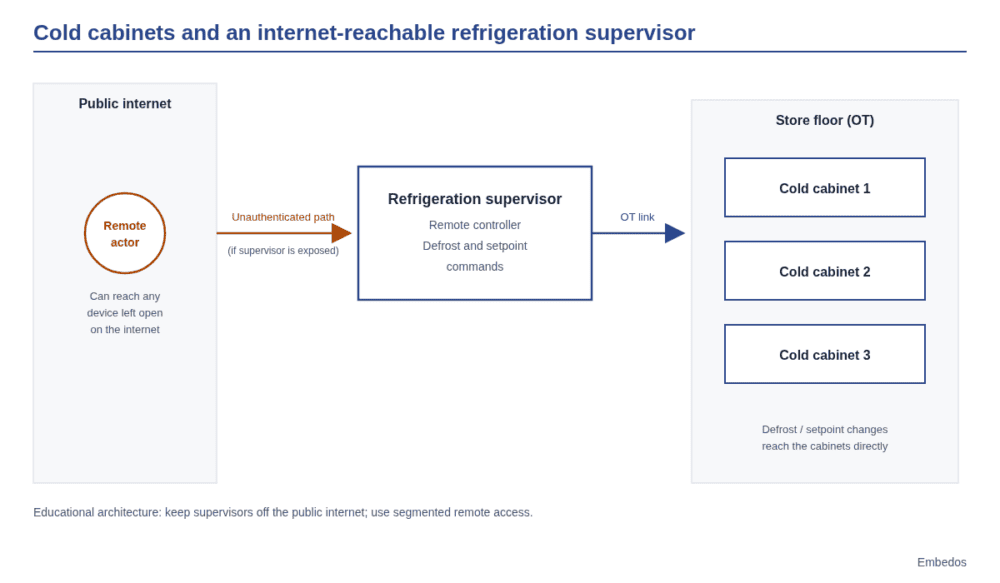
On the night of 11 to 12 October 2026, someone logged into the refrigeration supervisors of hundreds of French supermarkets and told the cold cabinets to defrost. Thierry Cotillard, CEO of the Mousquetaires group (Intermarché, Netto), said the attackers managed to put  “all our cold cabinets into defrost and raise them to as much as 50 °C”,  as quoted by franceinfo.

There was no ransom note. As of 13 October the attack had not been claimed. Nobody encrypted a file server. The target was the operational technology (OT) that keeps fresh and frozen stock cold: remote supervisors sitting on the internet, reachable by anyone who found them.

The French national CERT published alert CERTFR-2026-ALE-012 the same day. It names the affected product families: Danfoss AK-SM series, Danfoss AK-SC series, Copeland xweb and Dixell xweb. Three weeks later, a store in Bavaria saw the same thing happen to its cooling.

This post walks through what is confirmed, how the pattern changed over five years, and the steps CERT-FR and the German BSI actually published. Then a short note on why anyone running cold storage in India should read this carefully.

Embedos embedos-blogs diagram of supermarket cold cabinets controlled by an internet-exposed refrigeration supervisor.

What happened in France in October 2026

The CERT-FR alert is titled “Incident de sécurité ciblant les contrôleurs à distance des installations de réfrigération” (security incident targeting remote controllers of refrigeration installations). It was first issued on 12 October 2026, updated on 13 October to add more equipment, and updated again on 16 October with revised recommendations.

Retailers confirmed their own impact to the press. As reported by franceinfo on 13 October:

  • Intermarché and Netto: at least 300 stores
  • Coopérative U: fewer than 100 stores
  • E.Leclerc: “several” stores
  • Carrefour: 80 supermarkets
  • Monoprix: about 30 stores

The stated numbers alone add up to more than 400 stores, before counting U and Leclerc. The true national total has not been published by any official source.

Danfoss told franceinfo that “the majority of the devices concerned are obsolete products, notably the AK-SM800 and AK-SC355 systems, which have reached end of life and no longer receive software or security updates.”

The Paris prosecutor opened an investigation, assigned to OFAC, the French police office for cybercrime. Intermarché said its insurers do not cover this type of incident. Store managers quoted in the press gave losses of about €60,000 at Etréchy, €55,000 at Issy-les-Moulineaux and €270,000 across two Intermarché stores in Haguenau. Nobody has published a verified total.

What is not known matters as much. No official source has stated how the attackers got in. You will see claims about default passwords or specific vulnerabilities in commentary; none of them is confirmed by CERT-FR or the vendors, so we leave them out.

Germany: the BSI warning and Reisbach

On 13 October 2026 the BSI, Germany’s federal cyber security agency, issued a press release urging operators of internet-reachable control systems, including food-cooling systems, to secure them. BSI President Claudia Plattner said: “This attack could have hit any country and can find copycats at any time. Such entry points practically invite sabotage.” The BSI published recommendation BSI-CS 154, “Gefährdung durch internet-verbundene OT-Systeme” (threats from internet-connected OT systems), on the same day.

The warning was right. On the night of 1 to 2 November 2026, the Edeka store in Reisbach, Lower Bavaria, confirmed to BR24 that its cooling had been set to “50 Grad Heizen”, 50 degrees heating. Most of the stock was discarded. BR reported that the same wave hit stores in Belgium, Sweden, Ireland, Luxembourg, Estonia and the Netherlands, that no financial demands were made, and that experts suspect sabotage.

How many German stores were hit beyond Reisbach is not confirmed.

Five years of supermarket incidents: from IT to OT

The October wave looks sudden, but it sits at the end of a clear line. Earlier incidents in the same two countries hit IT systems and customer data. 2026 is the year the target became physical.

April 2021: tegut, Germany (cyberattack, IT)

Fulda-based grocer tegut was hit by a cyberattack in April 2021. Under its emergency plan, the company shut down and disconnected all head-office network systems, including the merchandise programmes that control disposition in logistics, as reported by heise. tegut warned of isolated gaps in product availability. Stores stayed open.

tegut refused to negotiate. In its press release relayed by fuldainfo, the company said it would not enter negotiations with criminals. The attackers then published company data on the dark web.

Lesson: a pre-planned isolation procedure kept the shop floor running even with head-office IT down.

October 2022: METRO, Germany, France, Austria (IT outage)

On 17 October 2022, wholesaler METRO suffered a cyberattack that caused a partial IT outage, confirmed in its newsroom. Store teams set up offline systems to process payments, as reported by SecurityWeek, with impact in Germany, France and Austria.

During recovery, METRO found malware again and shut down some systems a second time (newsroom status, 23 November 2022). Its 2021/22 annual report put the earnings hit in the mid-double-digit millions of euros.

Lesson: recovery is not done when systems come back. Reinfection during restoration is a real risk.

November 2024 to August 2025: Picard and Auchan, France (customer data)

In November 2024, Picard reported unauthorised access affecting 45,000 of its 11 million loyalty accounts, said it had not detected an intrusion into its information systems, and notified the CNIL (Le Parisien, quoting Picard).

Auchan disclosed a breach of more than 500,000 loyalty accounts in November 2024, with no bank data or passwords stolen, and notified the CNIL (franceinfo). On 21 August 2025 it disclosed a second loyalty-data breach affecting “several hundred thousand” customers (ICI).

October and November 2026: refrigeration OT

Then the October wave in France and the November Reisbach case in Germany. The difference is direct physical loss: product that has warmed up has to be thrown away, regardless of whether any data left the building.

One note on myths. We found no official confirmation of ransomware at Casino, Carrefour, Leclerc, Système U, Intermarché, Lidl, Aldi, Kaufland or Globus before October 2026. If you read otherwise, check the source.


Reviewing cold-chain OT exposure?

Tell us what you run on site and we will get back to you.

Why the refrigeration supervisor is such an easy target

A store refrigeration supervisor sits between the cabinets and compressor packs on one side and the refrigeration contractor on the other. The contractor wants to see alarms and change setpoints without driving to the store. The easiest way to give them that is a web interface on a public IP.

CERT-FR is blunt about this: “De manière générale l’exposition d’une interface de gestion sur Internet est contraire aux bonnes pratiques.” In general, exposing a management interface on the internet goes against good practice.

Add Danfoss’s own statement that most affected units were end-of-life models without security updates, and the picture is simple. Old supervisors, still in service because they still control the cold room, reachable from anywhere. The device does exactly what it is told, including defrost and heating.

Practical checklist: what CERT-FR and BSI tell operators to do

Everything below comes from CERTFR-2026-ALE-012 or the BSI press release of 13 October 2026 and BSI-CS 154. We have not added steps of our own.

1. Inventory and exposure check

  • List every refrigeration supervisor and controller across your sites, with model and firmware. Pay particular attention to Danfoss AK-SM, Danfoss AK-SC, Copeland xweb and Dixell xweb, the families named by CERT-FR.
  • Check which of these is reachable from the internet. The BSI tells operators to check their exposure.

2. Remove public internet exposure

  • CERT-FR’s first step: remove internet exposure of the affected units, and of any unit on a public IP.
  • BSI: block direct internet access to control systems.

3. Contractor remote access through VPN, with MFA

  • CERT-FR: restore remote access only through a secure VPN or a protected network. Filtering by source IP is acceptable only as a temporary measure.
  • BSI: use VPN and multi-factor authentication.

4. Patch, or replace end-of-life units

  • CERT-FR: update firmware, and for Danfoss units set security to “Strict” mode.
  • BSI: patch promptly.
  • CERT-FR warns that for end-of-life devices a factory reset alone is not enough, because the device stays vulnerable. If the vendor no longer ships security updates, plan the replacement.

5. Change default passwords

  • CERT-FR lists changing default passwords among its recommendations.

6. Review the full configuration, especially defrost windows

  • CERT-FR: check the whole configuration, in particular defrost windows. A compromised unit should be rebooted or factory reset and then reconfigured, keeping the end-of-life warning above in mind.

7. Read your insurance contract before cutting the contractor feed

  • CERT-FR: check your insurance contract terms before cutting the data feed to your refrigeration contractor. Intermarché said its insurers do not cover this type of incident, so check what yours actually say.

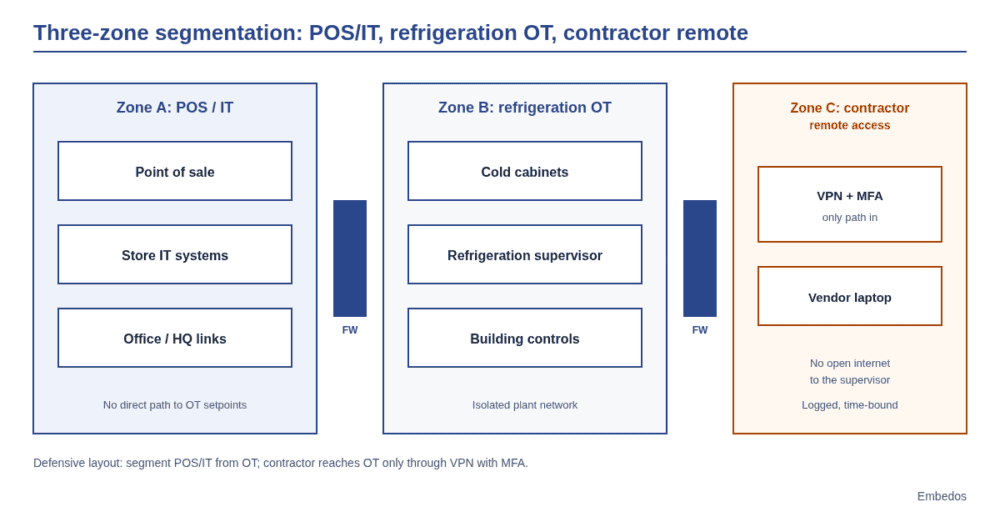
Segmentation: three zones, not one network

Embedos embedos-blogs three-zone plant diagram POS IT vs refrigeration OT vs contractor remote access.

The incidents above map to three different zones, and each should be treated separately:

Zone What lives there What went wrong in the timeline

A compromise in one zone should not hand over the next. The practical meaning of CERT-FR’s VPN and protected-network advice is that the contractor zone is a controlled entry point, not an open door on a public IP.

What this means for cold chain in India

We are not aware of any Indian incident like this, and we are not claiming one. The principle transfers anyway.

Cold storage warehouses, dairy chilling centres and pharma cold rooms in India increasingly use controllers that a contractor or OEM supervises remotely, often over Modbus to a gateway or supervisor. The pattern from France is the same: a controller that can change setpoints and defrost cycles, a contractor who needs remote access, and a temptation to make that access as easy as a public web page.

The CERT-FR and BSI checklist above applies almost word for word. Know what you have, take management interfaces off the public internet, put contractors behind VPN and MFA, plan the replacement of units that no longer get security updates, change defaults, and know what your insurer covers. For pharma, where a temperature excursion can mean a batch is written off, the defrost and setpoint review in step 6 deserves a regular slot in your maintenance calendar.

Visibility is the part you can add

None of the official guidance replaces the basics above, and monitoring is not a substitute for removing exposure. But in both France and Germany, the damage was a temperature change that someone had to notice. An independent view of cabinet and cold room temperatures, separate from the supervisor that is being instructed, tells you that something changed even when the controller itself has been told otherwise.

That is the kind of work we do with Embedos Edge, our platform of products, solutions, dashboards, insights and services for industrial telemetry. For cold chain, that means temperature and equipment telemetry, dashboards and anomaly alerts that sit alongside your existing refrigeration controls. If you run cold storage, dairy chilling or pharma cold rooms and want to talk through how to get that visibility, get in touch with our team in Mumbai.

Next step. Drop a Mail!

If you run a cold storage, dairy chilling, pharma cold rooms or general wrehouses, and want to talk through independent temperature visibility alongside your existing controls, email the Embedos team.

Email: team@embedos.io

Help Us Help You Leverage The Power Of Industrial Automation & Industrial IoT – IIoT.
Warehouse temperature and humidity monitoring system for agri commodities

A warehouse temperature and humidity monitoring system for agri commodities measures two different things.

Ambient relative humidity (RH) and temperature tell you about the air in the shed;

Grain moisture tells you about the stock.

Mould risk rises when the air between the grains stays above about 70% RH, so log ambient RH and temperature continuously, spot-check or probe the commodity itself, connect remote godowns over 4G, and alert on trends rather than single readings. If you’re searching forr a warehouse moisture monitoring system; this is it.

Anyone who is looking for warehouse operations heads, quality managers and engineers at agriculture warehousing and commodity storage firms, cold storages, logistics units, storage units, running many sheds across India.

embedos-blogs: photo of warehousing godown sheds in Uttar Pradesh, India, where temperature and humidity are monitored for stored commodities

Tell us what you need on site

Need this on your plant? Tell us your requirement

Ambient RH and temperature or grain moisture probes: what is the difference?

Grain and air trade moisture until they reach balance, the equilibrium moisture content (EMC). The Food And Agriculture Orgganisation of the United Nations (FAO) has procedures written for how one can efficiently store.  Guidance on post-harvest losses treats 70% RH as the “safe” level and gives the moisture in equilibrium with 70% RH at 27°C, for example 13.5% for maize and wheat.

FAO’s manual on post-harvest grain losses notes that fungi start growing above 65 to 70% RH.

FAO’s chapter on grain drying and storage adds that for most cereals EMC drops by about 0.5% for every 10°C rise at the same RH, and that grain in sacks can usually be stored 1 to 2% wetter than in bins.

  • Ambient sensors (RH and temperature in the shed air) are cheap, accurate and easy to network. A good digital sensor such as the Sensirion SHT45 is specified at ±1.0% RH and ±0.1°C. They tell you when ventilation will dry or wet the stock, and when the shed is drifting toward risk.
  • In-stack or in-bulk probes measure temperature, RH or moisture inside the stock, where spoilage starts. They cost more per point and need care when stacks are built and moved.
  • Moisture meters on samples remain the reference for each lot at intake and at intervals. FAO’s guidance describes the common measurement methods and their limits.
What is the safe moisture content for grain storage?

FAO gives the moisture in equilibrium with 70% RH at 27°C as the upper limit for safe storage: 13.5% for maize and wheat, with other values for other commodities. For long-term storage, aim lower. Always check the limit your quality contract or standard uses.

How many sensors does a shed need?

There is no single number; it depends on shed size, stack layout, roof heat and ventilation. A practical starting layout:

  • One ambient RH and temperature sensor per ventilation zone, at stack height, away from doors and direct sun.
  • One sensor near the roof on the hottest side, because roof heat drives moisture migration in the stock.
  • One outdoor sensor per site, so you can decide when opening vents will dry the shed rather than wet it.
  • In-stack probes in the stacks with the highest value or the longest planned storage first.

embedos-blogs: photo of a food grain godown building in Kerala, India

Connectivity for remote godowns: why 4G and store-and-forward matter

Agri warehouses are often outside town with no LAN. A gateway on 4G sends readings from each shed, and store-and-forward keeps them during network gaps so the history has no holes.

Check signal inside the shed, not at the gate: metal roofs and walls weaken it, and an external antenna may be needed.

Sensors inside the shed connect to the gateway over RS-485 Modbus RTU (see the Modbus specifications) or as 4-20 mA signals.

How should you set alert thresholds for spoilage?

  • RH trend alert: ambient RH above your limit (for example 70%, from the FAO guidance) for a set number of hours, not for a single reading after a rain shower.
  • Temperature rise in the stack: a probe reading rising while ambient is steady points to biological activity. Alert on the rise over a set period.
  • Ventilation advice: outdoor RH lower than indoor RH means opening vents can help; the reverse means keep them shut.
  • Sensor health: alert when a sensor stops reporting, so a dead sensor is not mistaken for a safe shed.
What humidity is too high in a grain warehouse?

Use about 70% RH as the warning line: FAO treats it as the safe level, and fungi start growing above 65 to 70% RH.

Alert on sustained readings rather than brief peaks, and check the stock itself when the alert fires.

What does a multi-site dashboard show?

A list of sites ranked by risk, then sheds within a site, with current ambient RH and temperature, outdoor RH, stack temperature trends and open alerts.

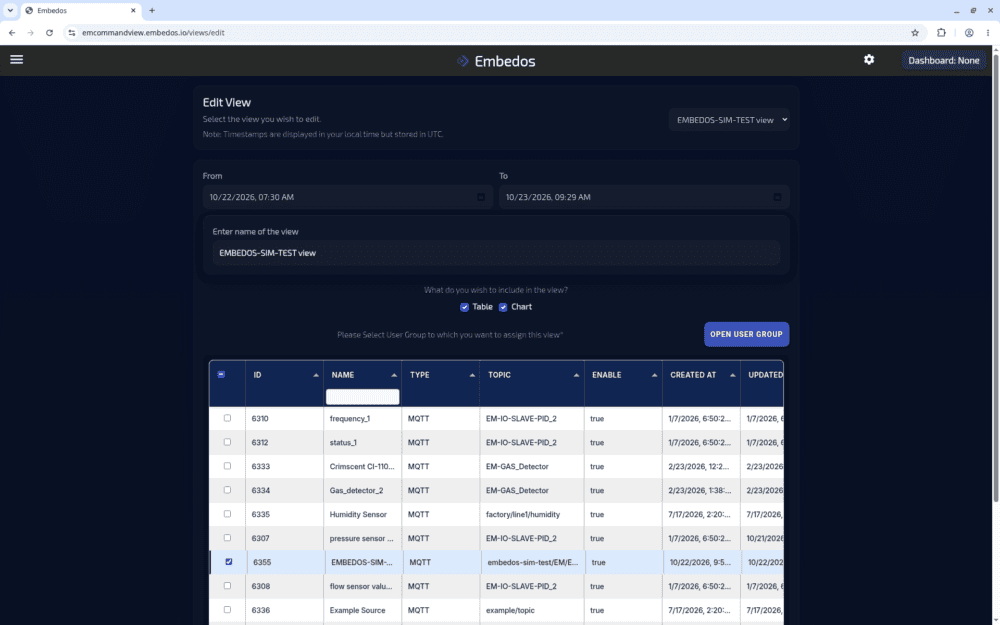
EmView, the Embedos cloud dashboard, provides monitoring, alerts and control views across sites. In EmView, a view groups sources such as humidity and temperature sensors into a table and chart for a set time window.

emview-view-data-sources-embedos-blogs: EmView view settings screen with a time window, table and chart options and the list of MQTT data sources to include

Automation angle: where Embedos Edge fits

Embedos Edge (the platform) reads RH and temperature sensors over RS-485 Modbus RTU or on 4-20 mA and 0-10 V inputs, sends data over GSM 2G/4G, Wi-Fi or Ethernet with MQTT or HTTPS, keeps it through outages with data buffering, and raises SMS and email alerts.

Logic on the device can run trend alerts locally, OTA updates and device health visibility help when sites are hundreds of kilometres apart, and EmView shows all sites in one place. Convert analog sensor outputs with our 4 to 20 mA loop scaling calculator.

Warehouse monitoring setup checklist

  1. List sites, sheds, shed sizes and the commodities stored in each.
  2. Mark ventilation zones, roof hot side and doors on a shed sketch.
  3. Choose ambient sensors and decide where in-stack probes are worth the cost.
  4. Check 4G signal inside each shed and plan antennas.
  5. Agree RH and temperature thresholds per commodity with the quality team.
  6. Decide who gets alerts at each site and who escalates.
  7. Plan sensor calibration checks and record them.
  8. Keep moisture meter readings at intake and at intervals alongside the sensor data.

Can an RH sensor measure grain moisture?

Indirectly. An RH sensor inside the grain mass reads the air in balance with the grain, and that can be converted to moisture using the commodity’s equilibrium curve. The curve varies with variety and temperature, so confirm with a moisture meter.

Do I need a separate sensor outside the warehouse?

Yes, if you want ventilation advice. Comparing outdoor and indoor RH tells you whether opening vents will dry or wet the shed.

Next step! Send us a Mail

Send your machine list, ages and what signals each one already has, and we will help you plan the wiring.

Email: team@embedos.io

Help Us Help You Leverage The Power Of Industrial Automation & Industrial IoT - IIoT.

OEE Monitoring System: What to Measure on Shop-Floor Machines

What is an OEE monitoring system?

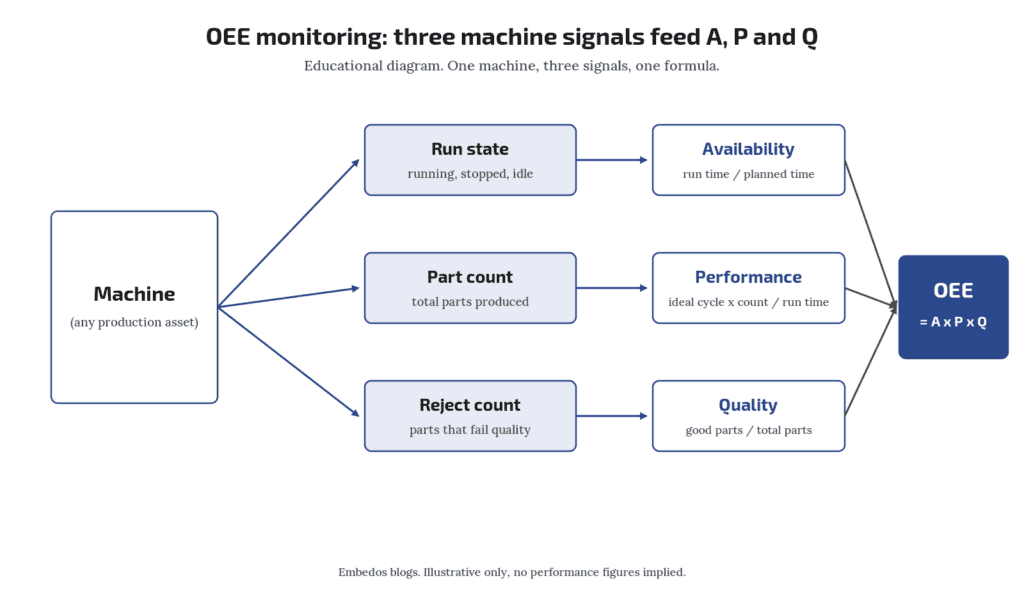
A setup that collects run state, part counts and reject counts from machines, and calculates availability, performance and quality, and their product, Overall Equipment Effectiveness (OEE)

An OEE monitoring system needs three groups of signals from each machine: a reliable running or stopped state (for availability), a part or cycle count against an agreed ideal cycle time (for performance), and a good or reject count (for quality).

OEE is availability × performance × quality.

On mixed-vintage shop floors the hard part is not the formula, it is getting a trustworthy run signal and part count from machines that were never built to report them.

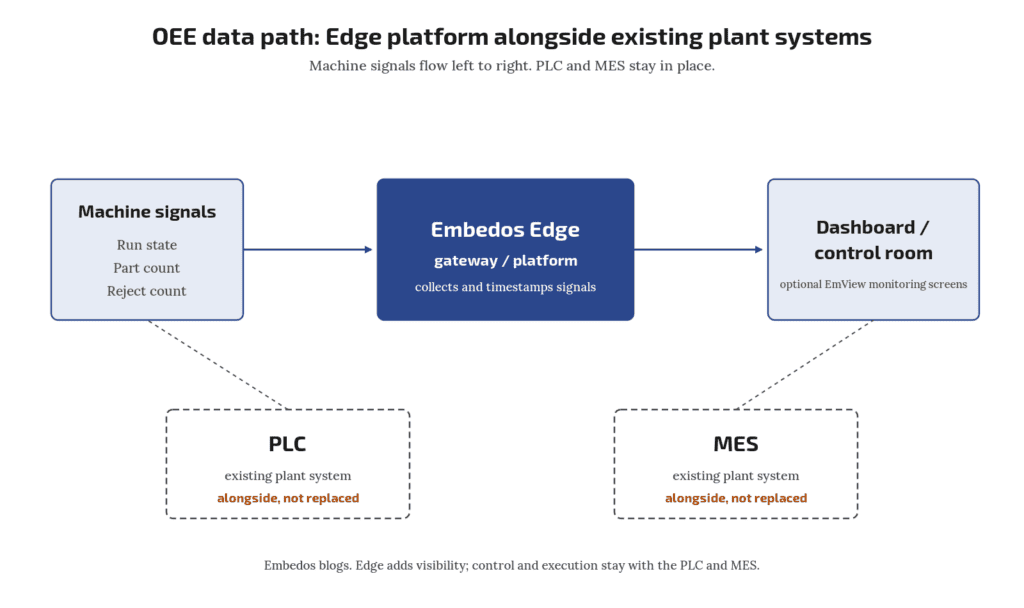
A logging layer or edge gateway can collect those signals and send them to a dashboard or control room; it does not replace your MES, SCADA or PLC.

Who this is for: production, maintenance and automation engineers who have been asked to “show OEE” for a line of presses, CNCs, moulding machines or packing machines of different ages and makes.

Is there a standard definition of Overall Equipment Effectiveness (OEE) ?

ISO 22400-2 defines Overall Equipment Effectiveness (OEE) among its manufacturing KPIs. Plants still need local rules for planned time and rework.

Tell us what you need on site

Need this on your plant? Tell us your requirement


Embedos blogs embedos-blogs diagram: three machine signals, run state, part count and reject count, feeding availability, performance and quality

Why this question keeps coming up

A recent enquiry from an instrumentation firm asked a common thing: their client wanted OEE on a set of older machines and wanted to know what had to be wired before any software discussion. That is the right order. Decide the signals first; the dashboard comes later.

OEE in one formula

OEE is defined as a key performance indicator in ISO 22400-2, the standard for KPIs in manufacturing operations management (ISO 22400-2:2014). In plain terms:

  • Availability = actual run time ÷ planned production time.
  • Performance = (ideal cycle time × total count) ÷ run time.
  • Quality = good count ÷ total count.
  • OEE = availability × performance × quality.

Worked example (illustrative numbers only): a shift has 480 min planned time. The machine runs 420 min, so availability = 0.875. Ideal cycle time is 30 s and it makes 760 parts, so performance = (0.5 min × 760) ÷ 420 = 0.905. 740 parts are good, so quality = 0.974. OEE = 0.875 × 0.905 × 0.974 ≈ 0.77.

Each factor depends on a different physical signal. If one signal is wrong, the OEE number is wrong in a way the formula will not show you. If you want the reasoning for measuring this before buying an MES, read our post on an OEE baseline before MES.

How do I record downtime reasons?

Operator entry on an HMI, button panel or tablet, with a short reason list agreed with production.

Availability: get the run signal right

Availability needs two things: when the machine is running and what counts as planned time.

Run signal options, roughly in order of preference:

  1. A PLC or CNC status bit (cycle active, auto mode, spindle on) read over the machine’s own interface, if one exists. Check the controller vendor’s documentation for which bit means “producing” and not just “powered”.
  2. A spare contact or output from the machine’s control circuit, such as a motor contactor auxiliary contact or a cycle-start relay, wired to a digital input.
  3. Motor current via a current transformer and a threshold. This works on machines with no spare contacts, but you must pick a threshold that separates idle from cutting or pressing. Idling hydraulic pumps can draw a lot of current while nothing is produced.
  4. Spindle or shaft speed from a proximity sensor on a rotating part.

Planned time is a business rule, not a sensor. Agree shift times, breaks and planned maintenance with production before you start, or availability will be argued over forever.

Downtime reasons (no material, tool change, breakdown, waiting for QC) usually come from an operator entry: a button panel, an HMI screen or a tablet. Keep the list short; ten reasons that people actually press beat forty that nobody uses.

Is "machine powered on" good enough as a run signal?

Usually no. A machine can be powered and idle for hours. Use a signal tied to production, such as cycle active, a stroke, or a load threshold on motor current.

Performance: count cycles, not guesses

Performance needs a total count and an ideal cycle time for each product or die.

  • Count source: a stroke or cycle pulse from the controller, a proximity sensor on a moving part, or a photoelectric sensor at the outfeed. For high speed counts, check that the input’s maximum count frequency covers your fastest cycle. Inductive proximity switches are covered in IEC 60947-5-2:2019.
  • Multi-cavity or multi-up tools: one stroke can make several parts. Store parts per cycle with the job, not as a fixed machine setting.
  • Ideal cycle time: take it from the process engineer’s standard, not from last month’s average. If you use an average, poor performance becomes the baseline.

Micro-stops (stops of a few seconds) are often where performance loss hides.

A count signal logged with a timestamp lets you see them later without any extra sensor.

Where do I get ideal cycle time for old machines?

From the process sheet or the machine nameplate rating for that job. If neither exists, run a clean trial with an experienced operator and record the best sustained rate, then get production to agree it in writing.

Quality: the signal most plants skip

Quality = good ÷ total. Sources:

  • Automatic reject: a reject gate, a checkweigher or vision system output, wired as a second count.
  • Operator entry: rejects entered per shift or per lot on an HMI or tablet.
  • Rework: decide up front whether reworked parts count as good. ISO 22400-2 treats quality ratios in terms of good quantity, so write the rule down.

If you only have end-of-shift reject entries, quality will be daily rather than live. That is fine for a first baseline.

Download the Free “OEE Monitoring Signal Checklist”

Enter your email and the form emails you the copy link to the Google Sheet.


Can I measure OEE on machines with no PLC?

Yes, using external signals: contactor auxiliary contacts or a current threshold for run state, and proximity or photoelectric sensors for counts.

Signal checklist for mixed-vintage machines

Use this per machine. It doubles as the downloadable checklist (lead magnet: oee-monitoring-signal-checklist).

Item Newer machine (has controller interface) Older machine (relay logic or none)
Run state Controller status bit over its protocol Contactor aux contact or CT current threshold
Cycle count Controller counter or cycle-complete bit Proximity or photoelectric sensor on stroke or outfeed
Parts per cycle Job recipe Manual entry per job
Reject count Reject station output Operator entry
Downtime reason HMI screen Button panel or tablet
Timestamp source Gateway or server clock synced to NTP Same

Points to check on site:

  • Is there a spare contact, or do you need an interposing relay so you never load the machine’s control circuit?
  • What voltage is the signal: 24 V DC, 110 V AC, 230 V AC? Use the right input or an isolating relay.
  • Can the machine’s own controller be read without affecting its program? Ask the OEM before connecting anything to a running controller.
  • Who owns the clock? Every count and stop should carry one consistent timestamp. NTP is defined in RFC 5905 (IETF).
Do I need to open the machine's PLC program?

Not always. Many retrofits use only external signals (contacts, CTs, proximity sensors) so the OEM program is untouched. That keeps warranty and validation discussions simple.

Where an edge gateway fits, and where it does not

An edge gateway or logger sits between the machine signals and the dashboard. Its jobs are narrow:

  • read digital inputs, counters and analog signals, or poll a controller over Modbus or similar;
  • timestamp and buffer data if the network drops;
  • send data to a server, cloud or control room screen.

It does not run your machine, replace the PLC, or replace an MES that handles work orders, genealogy and scheduling. For retrofit wiring and protocol options on older machines, see retrofitting legacy machines with OPC UA and Modbus. For Modbus itself, the protocol specifications are published by the Modbus Organization.

Embedos Edge is our platform of products, solutions, dashboards, insights and services. On an OEE project it captures machine and sensor data and sends it to the cloud or a control room, with homepage widgets and smart alerts for stoppages. EmView monitoring screens can show the same data in a control room (sign in at emcommandview.embedos.io; )

It sits alongside your PLC, SCADA and MES; it is not a replacement for any of them. Any OEE figure it shows is only as good as the run, count and reject signals you wire into it.

Embedos blogs embedos-blogs diagram: machine signals to edge gateway to dashboard and control room, with PLC and MES shown alongside, not replaced

Common mistakes

  1. Counting from the wrong point. A sensor before a reject gate counts total; one after it counts good. Know which you have.
  2. Mixing ideal and average cycle times across products.
  3. No agreed planned time, so availability changes depending on who reads the report.
  4. Trusting a single number. Always look at A, P and Q separately. An OEE of 0.77 tells you little; availability of 0.875 with performance of 0.905 tells you where to look.
  5. Starting with too many machines. Wire two or three, check the counts against the shift register for a week, then roll out.

Validate before you report

For the first week, compare logged counts with the operator’s shift register and logged stops with maintenance records. Differences point to a bad signal choice, not bad operators. Fix the signal, then publish numbers.

Does an OEE system replace MES or SCADA?

No. It gives you measured losses. MES handles orders and genealogy; SCADA handles supervisory control. A gateway feeds data to them or alongside them.

Next step! Send us a Mail

Send your machine list, ages and what signals each one already has, and we will help you plan the wiring.

Email: team@embedos.io

Help Us Help You Leverage The Power Of Industrial Automation & Industrial IoT - IIoT.

Digitise a Bursting Strength Tester: Peak Hold to Wi-Fi Log

A manual bursting strength tester can usually be digitised without replacing the machine.

You add a pressure transducer on the hydraulic line, a controller with a display that shows live pressure and holds the peak at the moment of burst, a peak reset and tare, a field where the operator enters GSM. GSM = grams per square metre (g/m²).

So the bursting factor (BF = bursting strength ÷ GSM, with consistent units) is calculated automatically, a serial (RS-485) output to a printer, and a Wi-Fi log to CSV or Excel. The diaphragm, clamp and pumping mechanism stay as they are, so the test method does not change.

Calibration against a traceable reference is still required before results are used.

Who this is for: quality and lab staff in paper, board and corrugated packaging units who run a dial gauge tester today and want readings that are logged, not written by hand.

Tell us what you need on site

Need this on your plant? Tell us your requirement

How is bursting factor calculated?

Bursting factor = bursting strength ÷ grammage (GSM).

In the kgf/cm² convention it is multiplied by 1000. In SI terms, burst index = burst strength in kPa ÷ GSM, in kPa·m²/g.

Can I keep my existing manual tester?

Often yes, if the clamp, diaphragm and pump are in good condition. The retrofit adds sensing and logging; it does not repair worn mechanics.

How a bursting strength test works

Bursting strength is the hydraulic pressure needed to rupture a sheet clamped over a circular rubber diaphragm. The 1966 edition of IS 1060 Part 1 describes the tester as hydraulic pressure, transmitted through glycerine or compressed air, acting on a pure gum rubber diaphragm in contact with the paper, and it asks that the gauge be chosen so each reading falls between 25% and 75% of the gauge capacity (IS 1060 (Part 1) 1966, public text). Today the bursting strength method for paper is IS 1060 (Part 6/Sec 2):2024, identical to ISO 2758:2014 (Intertek Inform listing for IS 1060 (Part 6/Sec 2):2024). IS 1060 Part 1:2022 (amended October 2025) is a separate part covering general purpose tests. The international methods are ISO 2758:2014 for paper and ISO 2759:2014 for board.

On a manual tester the operator watches a dial with a lazy (maximum) pointer and reads the peak after the sheet bursts. The weak points are reading error, a lazy pointer that sticks or is not reset, and results copied by hand into a register.

Retrofit or buy a new digital machine?

QuestionRetrofit points toNew machine points to
Mechanical conditionClamp, diaphragm and pump are soundFrame, pump or clamp are worn
What is missingDisplay, peak hold, loggingMotorised drive, controlled pumping rate
Method complianceExisting method already accepted by your customersCustomer asks for a specific standard machine
DowntimeShort change on siteFull replacement and requalification

Note the pumping rate. The 1966 IS 1060 text (clause 12.5.2) asks for pressure to rise at about 0.75 kg/cm² per second and does not recommend hand operated hydraulic testers as standard practice. If your manual tester is hand cranked and the rate varies by operator, a display alone will not fix that, and a motorised drive may matter more than the electronics. Check the rate of loading in the current IS 1060 (Part 6/Sec 2) or ISO 2758 text before you decide.

We are not giving cost comparisons in this guide; get quotes for both routes on the same feature list below.

The feature list

Live pressure and peak hold

A pressure transducer on a tee in the hydraulic line replaces, or sits beside, the dial gauge. Size its range so normal bursts fall in the middle of its span; the same 25% to 75% idea from IS 1060 applies. Ask for the transducer’s datasheet accuracy, overload rating and media compatibility with glycerine.

The controller samples pressure fast enough to catch the peak. At burst, pressure drops sharply; the controller must hold the highest value seen. Ask the supplier what sample rate the peak detection uses and how they verified it against a reference gauge. No sample rate figure is stated here because it depends on the hardware chosen.

Peak reset and tare

  • Peak reset: a button (or automatic reset on the next pressure rise) clears the held value. A missed reset is the digital version of a stuck lazy pointer, so the log should record the reset event.
  • Tare (zero): zeroes the reading with the clamp open and no pressure, removing transducer offset. Do it at the start of each shift and log it.

Bursting factor from GSM

The operator enters the grammage (GSM, g/m² measured per ISO 536) of the lot. The controller computes:

Bursting factor = bursting strength ÷ grammage

Units must match. Common practice is bursting strength in kgf/cm² multiplied by 1000 and divided by GSM, or bursting strength in kPa divided by GSM to give the burst index in kPa·m²/g. ISO 2758 reports burst index as kPa·m²/g. Pick one convention, show the unit on screen and in the log, and do not mix them between reports.

Worked example (illustrative numbers): a board with 150 GSM bursts at 6.0 kgf/cm². 1 kgf/cm² = 98.0665 kPa (by definition of the kilogram-force, NIST SP 811), so 6.0 kgf/cm² = 588.4 kPa. Burst index = 588.4 ÷ 150 = 3.92 kPa·m²/g. Bursting factor in the kgf convention = 6.0 × 1000 ÷ 150 = 40.

RS-485 printer output

Many lab printers accept serial input. RS-485 (TIA/EIA-485) is a differential bus that tolerates long cable runs and plant noise better than single-ended links (TI SLLA272). Agree the print format: date, time, operator, sample ID, GSM, peak, BF, units. If the printer only has RS-232, a converter is needed; ask who supplies it.

Wi-Fi log to CSV or Excel

Each test becomes one row: timestamp, sample ID, operator, GSM, peak pressure, BF, tare and reset events. Ask:

  • Where the file lives (on the device, on a PC share, or in a cloud folder)
  • What happens if Wi-Fi drops mid shift (local buffer, then sync)
  • Whether the file can be edited after the fact (for audit, it should not be, or edits should be logged)
  • Whether the export opens directly in Excel without reformatting

Calibration and traceability

A digital display is only as good as its calibration. Ask for calibration of the pressure chain (transducer plus controller) against a reference traceable to national standards; in India that traceability runs to the CSIR National Physical Laboratory (CSIR-NPL), typically through an NABL accredited lab (NABL). Also keep the diaphragm check described in your test standard, since a stiff or worn diaphragm affects results regardless of electronics.

We make no accuracy claim for any retrofit here. Accuracy depends on the transducer, controller, calibration and mechanics, and should be stated on the calibration certificate.

How often should the pressure chain be calibrated?

Follow your quality system and customer requirements. Set the interval in your quality system; this guide does not mandate one.

Does digitising make my results comply with IS 1060?

No. Compliance depends on following the method: apparatus, conditioning, rate of loading and calibration. Electronics help you record results reliably.

Download the Free “Burst Tester Digitisation Checklist”

Enter your email and the form emails you the copy link to the Google Sheet.


Questions to ask any retrofit supplier

  1. Which transducer range and accuracy class, and is it rated for the hydraulic medium?
  2. How is peak captured, and how was it verified against a reference?
  3. Is tare and peak reset logged?
  4. Which BF convention and units are used, and can the GSM be entered per lot?
  5. What print format goes to the RS-485 printer?
  6. Where is the log stored, what happens when Wi-Fi drops, and is it tamper evident?
  7. Who calibrates, against what reference, and how often?
  8. Does the retrofit change anything mechanical (pump, clamp, diaphragm)?

Where an HMI controller can fit

If you would rather build the retrofit around a panel HMI than a dedicated indicator, the Em Bose EB series has analog inputs for 4-20 mA or 0-10 V transducers, RS-485 for a serial printer or PC link, and HMI and application logic. Peak hold and bursting factor calculation on it are application and configuration dependent, so they are set up per project, not a standard feature. Embedos does not sell a bursting tester product, and nothing here is a certified test claim.

FAQ

What is a digital bursting strength tester?

A burst tester that measures pressure electronically and displays it, usually with peak hold, bursting factor calculation and data output, instead of reading a dial gauge by eye.

Why log tare and peak reset events?

They show that every test started from zero and that a held peak was not carried over from the previous sample.

Next step

Send a photo of your tester’s gauge and nameplate, and the fields you want in the log, to

Email: team@embedos.io.

Help Us Help You Leverage The Power Of Industrial Automation & Industrial IoT – IIoT.